Tuesday, February 1, 2011

Jury Duty: iPad App for Voir Dire (Jury Selection)

Author’s Comment: I will begin by thanking all of those who share their experience and knowledge with us, and those who help promote it on a grand scale. When it comes to legal-related iPad apps, sites like iPhone J.D., The Mac Lawyer, Tablet Legal and Law with an Apple are a few must-see resources. For the broader topic, Law Technology News has been around for many years, and with their new site design, featuring breaking news and up-to-the-minute articles that could become stale before making it to print, it appears they plan to be around a while longer. I hope you’ll add the Court Technology and Trial Presentation Blawg to your list of helpful resources, too.
  

Reprinted with permission from the Jan. 31, 2011 issue of Law Technology News. ©2011 ALM Media Properties, LLC.

I first learned of Jury Duty, designed by Texas attorney Stacy Kelly, while reviewing iJuror and JuryTracker and reported on it on the Court and Trial Technology Blawg. When I first spotted the application, I thought it might be a new game or entertainment app -- something to entertain a juror while dispatching his or her duty, as opposed to an aid to a legal professional involved in the process. I soon realized it was another app aimed at the same market as iJuror and JuryTracker. The competition is heating up in the "no-more-sticky-notes" litigation software category.

When the app is first opened, I was greeted by a familiar but rich-looking image of a balancing scale attended by a gavel, along with the statement: "For a More Effective Voir Dire." Voir Dire originates from the Latin term, verum dicere, which literally means, "speak the truth," and refers to the process of screening, rejecting, and selecting potential jurors.

The Panels button opened the case caption dialog, which allows me to create and store multiple cases. Once I opened an existing case, or entered the data for a new matter, I assigned specific voir dire topics to be addressed -- you can also begin to input the jurors' personal information.


The app takes advantage of the iPad's vivid display to add some nice attention to detail in realistic courtroom graphics.I really feel as though the app captures a "natural" workflow of selecting a jury. My advice, learn the apps workflow and stick to it. People do things in different ways, but when using an app such as this, you will benefit by following the flow as it was intended in court, and designed on the app. For example, I selected Jury, then Add Juror, and went right to the jury panel information dialog to enter each juror's attributes. You can quickly save and retrieve all of their important information in one place, including a temporary juror number assigned in the order of entry.
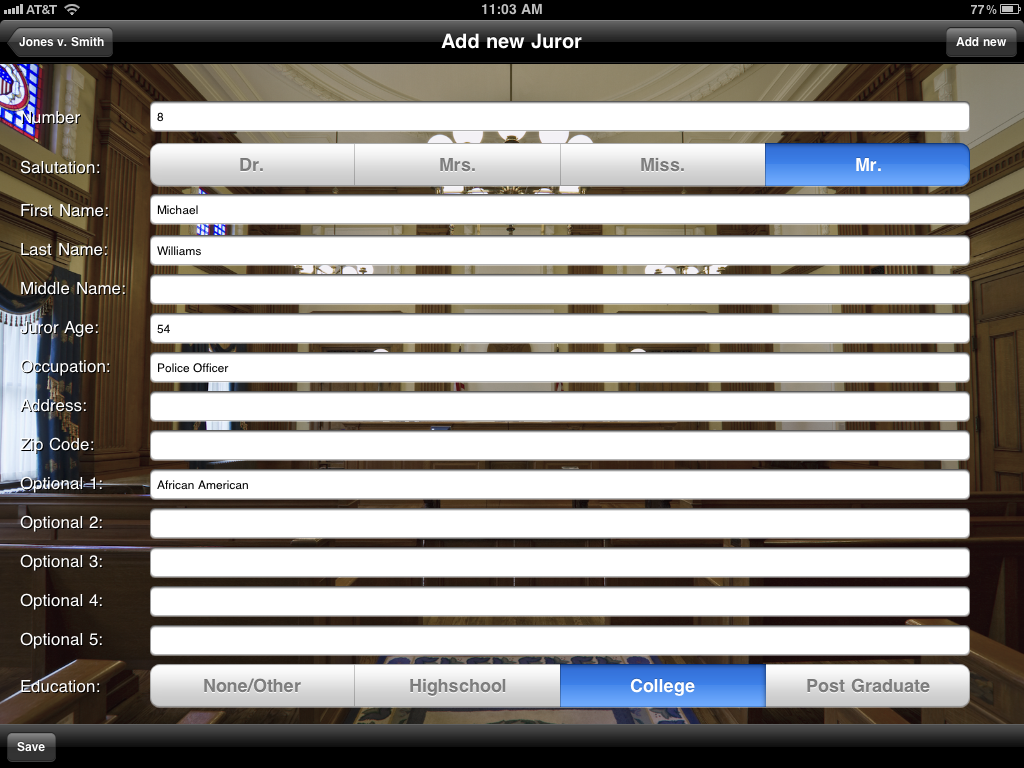
You can change the assigned juror number, but the designation does not assign them to a seat at this point. Data fields include basic people characteristics with plenty of room for notes. Completion of one field automatically puts the cursor at rest in the next field of entry, rather than having to tap each new field. This process would likely be most efficient when getting a set of jury questionnaires for review the night before selection. Working in this manner would be a bit more difficult to do on-the-fly, if you don't have your juror information set up ahead of time.

The Seating Chart view gave me the layout of the jury panel and displayed the juror number (if assigned to a seat). A little more info might be helpful here, such as the name of the juror. Although you can assign up to 200 prospective jurors, the icons are restricted to one section of the screen, which means that beyond 60 or so (six rows of 10 chairs each), they begin to get very small. Even so, if you have a complex matter and a large pool, having the ability to add up to 200 seats can be very helpful.

Tapping on a seat brought to the screen the list of juror names, so you can assign a juror to that seat. You can also drag and drop assigned jurors to any seat. Once jurors have been assigned to a seat, tapping it again will bring up that juror's basic information, along with handy options to accept, reject, strike for cause, positive or negative impression, and a notes field. Saving your input here changes the seat color from white to blue, allowing you to quickly see who you have and have not spoken with.

The Voir Dire Topics feature lets you add information that addresses the entire panel, rather than to each juror individually.

Jury Duty is designed to have your jurors' information filled out ahead of time -- which works fine if you have sufficient prep time. If you want to add new jurors, you have to go back to the case caption screen and add them from there. It would be helpful to be able to add them directly from the seating chart. It might also be helpful if the spell-checker were disabled, thus preventing names and other terms from auto-correction, e.g., "Davey" was corrected to "Raven." I would much prefer my own spelling errors in an app such as this, which I could (hopefully) decipher more easily.

Jury Duty's Report feature is nice and includes each juror's name and number; whether you accept, reject, or strike for cause; and whether your general impression of the juror is positive or negative.


Although the information is entered and saved using the pop-up dialog box that ensues after clicking a seated juror, other than this report, you cannot tell what you've entered from the visual display -- you have to dig. It would be helpful to quickly see which selections you made for each juror, rather than having to refer to a report. Reports are generated in an e-mail message format; there is also offers a Print function. iOS 4.2 does not support printing on its own, but you can add a printing app such as Printopia, a $10 app which prints wirelessly to your network or creates PDF files. (Note: Printopia works only via a networked Mac computer)

Overall, I like Jury Duty, and if you have time to enter names and information ahead of time to quickly assign them to a seat during voir dire, it will work great. This app competes more directly with iJuror than JuryTracker. Although you can observe your jury during the trial, adding notes or observations would be an entirely manual process.

With ample time to input case and juror details, Jury Duty looks like another good app that avoids the use of sticky-notes during voir dire.

Ted Brooks is a trial presentation consultant, author, and speaker, with offices in Los Angeles & San Francisco. E-mail: ted@litigationtech.com. Blog: Court and Trial Technology Blawg.

:::: PRODUCT INFORMATION ::::
Jury Duty, Stacy Kelly, $39.99

Ted Brooks, President
Litigation-Tech LLC
"Enhancing the Art of Communication"
213-798-6608 Los Angeles
415-291-9900 San Francisco

Thursday, January 27, 2011

Mobile Apps for Law – A New Searchable Database for Legal Professionals

First, I’ll share the press release:

“Mobile Apps for Law (www.mobileappsforlaw.com) is a just-released comprehensive database on the web covering all legal research and utility apps for all types of mobile devices. Whether you use an iPhone, iPod Touch, iPad, BlackBerry, Android, Palm PC, or...this is the place to find out which law apps are available for your device.

“The database includes over 800 different mobile applications for law and lawyers, and is growing weekly. Each entry provides detailed information, including: title, publisher, description, subjects, price, devices, version, size, last update date, links to reviews, where available, and most importantly, a link to click on to download the app immediately to your device.  Powered by dtSearch, the search function allows you to search through the entire database, or to limit by specific fields, such as title, subject, or device.

“Brought to you by InfoSources Publishing, pioneers in the field of reference publishing for law since 1981, Mobile Apps for Law is the only database devoted to mobile apps for lawyers. For a limited time, subscriptions are being offered at a 50% discount.”

At first, I wondered, since this a paid subscription service, if I would be getting downloads of the software included as part of the fee – now that would be nice. Well, if that sounds too good to be true…
So, at the “Special Introductory Price” of $25 for the subscription (50% off), what does it include, and do I need this?
The full-featured search functionality is similar to what you’d find in litigation support software – in fact, dtSearch has been used for years by law firms and vendors. While the search engine is much better than you might expect, it appears the searchable data may have a few holes.

I ran several searches to see what would turn up, and what would not. Here are the results of a few search terms:

Trial Presentation - No hits for “trial presentation,” even though Evidence included both terms in its description, and TrialPad included the terms “trial” and “present.” It makes me wonder how the search is configured. I can’t see how it could miss this with a simple Boolean search.

Present - Brought 2 app hits: Evidence and TrialPad. The TrialPad app result listing shows version 1.02 (rel. 1/6/2011), although the current version is 1.5 (rel. 1/26/2011) Not sure how frequently this database is updated, but this is already at least a day behind.
Jury - Brings 4 hits, including TrialPad, which only mentions the term in the description. The search did not locate another new jury selection app, Jury Duty, released 1/18/2011 – nine days prior to writing this article. With the crazy-fast pace of iPad app development, it would be nice if there were truly some way to have an up-to-the-minute resource. The search doesn’t appear to be operating in a consistent fashion, unless perhaps it is searching another set of linked data.

California Rules - did not turn up any apps published later than 7/27/2010, thus not including AB 2284, the new Expedited Civil Jury Trial Act – a very important recent California law. Looking at the actual app site for one of them revealed that it had indeed been updated as of 1/13/2011.

With a 32 bit browser, clicking the link to download goes to the iTunes web page and then launches iTunes on your computer with the app all linked and ready for downloading. A 64 bit browser does not launch iTunes properly.

Links to reviews are included in the search results. Although several of my reviews have been published on this blog, Law Technology News, and even at least one on an app site, they were not included in the listings (now that hurts). TrialPad had no reviews listed. Clicking a link to a review leaves the current page. It would be better if the site launched a new page, leaving the search results in place. There appear to be a few minor html coding issues with the site. Once again, I am curious as to where the information is coming from, as the currency and search results appear to be somewhat inconsistent.

Next, I decided to try searching for an app that is not legal-specific, but yet is very popular in the legal community.

Documents – This term brought a number of apps, including “Documents To Go.” When I isolated it to the BlackBerry version of the app, there no apps listed, even though the DataViz site shows several.

CONCLUSION

So, would I recommend shelling out $25 to be able to locate some, but not necessarily all available apps? This site is brand new, and I would expect it to be refined and tuned up in the coming months. If you are looking for one place to get a lot of info with direct, easy links, this is a good resource. However, after seeing the actual results, I would also want to search iTunes and the web for any others I might have missed. It looks promising, but I’m not sure I’m ready to pay for searching for openly-accessible apps or information just yet, unless I’m getting something else with it, and/or I know that it will bring every possible result.
Ted Brooks, President
Litigation-Tech LLC
"Enhancing the Art of Communication"
213-798-6608 Los Angeles
415-291-9900 San Francisco
Download vCard
Request Rates and Info
http://www.litigationtech.com/
http://trial-technology.blogspot.com/

Monday, January 24, 2011

iPad Apps for Lawyers: iJuror, JuryTracker, Jury Duty, WordPerfect Viewer

Author’s Comment – Well, as soon as my reviews of iJuror and JuryTracker were safely in the hands of Technology Editor Sean Doherty of Legal Technology News, and just in time for their brand-new site launch (looks great, by the way), I discovered that Jury Duty, yet another new iPad app, had just been released. Jury Duty is designed by Texas Attorney Stacy Kelly, priced at $39.99. I will be reviewing it for Law Technology News (see screen-shot preview at end of this article).


Also, for those of the WordPerfect persuasion (as many law firms are), you will be happy to know that there is a new iPad app just for you – the WordPerfect Viewer by Corel, only $4.99 (you heard it here first). This new app lets you read, search and place bookmarks in your .wpd files. Unfortunately, you cannot edit them. I’m sure that’s on the way soon.

If you know of any new legal-specific apps or other things you’d like me to consider for review, just let me know. If you have any trials coming up, I’d be happy to help out with that, too! Thanks for reading!
Reprinted with permission from the Jan. 21, 2011 issue of Law Technology News. ©2011 ALM Media Properties, LLC.
Reference to this review has been featured on iPhoneJD.

Selecting and Monitoring a Jury on an iPad
Ted Brooks

Two iPad Apps for Jury Selection and Monitoring

In a recent article published in Law Technology News, "Two iPad Apps Make Their Cases for Trial," (see enhanced version here) I noted that the iPad is currently one of the hottest topics on the internet. To determine how attorneys and other legal professionals use iPads, I conducted an informal poll on LinkedIn. The results showed that, although the majority of respondents view their iPads equally, as a toy and a tool, the next-highest group used it more for work than play. And one important part of work in the legal profession is a jury trial.

Two iPad apps have been developed to aid in selecting and monitoring jurors: iJuror, from Front9 Technologies, and Jury Tracker, from John Cleaves, who recently shared how to "Build Your Own App."

Although both apps relate to the observation of jurors, each is focused on a different part of the process, and thus do not necessarily compete directly against one another. In fact, one might even want to utilize both apps in a jury trial -- something that won't make a big dent in your savings, at $9.99 for each. iJuror is focused more on the jury selection process, while JuryTracker is designed for use during trial.

IJUROR

When I first started iJuror, there were four buttons showing: New Trial, Saved Trials, Stats, and CLE Credit Tracker, which is actually just an advertisement link to another app in the iTunes store. Clever, but I can live without that one.

If you'd like to change the desk interface to walnut from the default mahogany, you can tap the options icon, which looks like a gear in the top right corner. The options window also lets you change the seat in which juror No. 1 is located, and whether you'd like your last-opened case to automatically start next time you launch the app.

One problem in setting where you place the first juror: the setting applies to all cases -- but not all courtrooms are set up the same. So if you have more than one case going at a time in different courts, you may have to reset the jury seating order on the app for each trial. It would be nice to save a jury seating template for each trial.

I liked the look and feel of this app -- the interface is like a legal pad, complete with a pen lying on it, and moving from task to task was akin to flipping through pages on a real yellow pad. After I set the juror seating order, the next option was to create a new trial. Once I entered my case name, date, and the number of jurors and alternates, I then tapped the Save New Trial button where my information was available from the Saved Trials list.

Since it takes a lot of data entry to create a case to work with, it would be nice if iJuror (and JuryTracker) was preloaded with sample case information to aid in quickly learning the app.

After I created a case, I opened it and entering the details of up to 60 prospective jurors. The layout of the interface is determined by how many jurors and alternates there are.

Most anyone who has been in trial with a jury consultant has played the sticky-notes version of musical chairs. Although sticky notes are a proven method of moving names and their information quickly around in a seating chart, it can be a little clumsy. In effect, iJuror can play sticky-notes, but doing the same thing on an iPad is just plain cool. I would expect professional jury consultants will be using this app, in addition to attorneys.

There are a couple of ways to enter information on each prospective juror. You can tap on an empty seat, which then brings up a form where you can enter their name, work, hometown, and additional notes. You may then tap on the top line, which opens up a dialog that looks something like a slot machine (see Figure 1, below), with choices to "roll" into place: age, gender, race, marital status, number of children, education, and whether you generally like or dislike them.


Figure 1. Click image to enlarge

.

The information you enter is also reflected in the icon on the desktop (see Figure 2, below), including long or short hair, female or male, and skin color according to race. You can also select whether there are any familial relation with a police officer, if they have prior arrests, whether they have been a victim, whether they've served on a jury, and whether there was a verdict. These last few options also have an N/A option.


Figure 2. Click image to enlarge.


During voir dire and jury selection, you also have the ability to flag jurors for peremptory challenge, dismissal them for cause, or simply delete them. There is a Quick Enter feature, which allows you to quickly enter basic information: gender, race, and name. You can then complete the details later. Another option is a multiple-juror view, which allows you to view each juror and their attributes on one page.

Once you have details on the jurors, you can then drag and drop their icon to another seat (to perhaps dismiss and replace a juror), or into a Peremptory or Dismissal bucket -- each bucket shows how many jurors are in it and tapping on a bucket displays its contents. This is much more fun than sticky-notes.

Once you've reached the end of the day, or have completed jury selection, it would be nice to have this information available to discuss. In the upper right-hand corner is perhaps the most useful button of all -- it looks like an envelope. Tapping the little envelope will prepare a detailed report of everything you entered, and automatically generate an e-mail for you. E-mail the report to yourself, co-counsel, jury consultants, your client, or whomever you wish. That feature is quite a bit easier than photocopying an oversized sticky-note chart, or rewriting the whole thing. While the purpose and functionality of this app is somewhat limited (as you might expect from an app), it works.

JURY TRACKER

The first step in the process for Jury Tracker is to set up a new case file. While there is an option to select previously created cases, there is no sample case included. As noted above, sample data would be helpful to quickly learn the app.

Setting up the case information is somewhat automated, in that once you complete one field, you automatically advance to the next -- a nice touch. While some fields bring up the keyboard for data entry, others have a drop-down menu with a few common choices to select. Everything worked out nicely until I had to enter the number of jurors and alternates. I was forced to select either 6 or 12 jurors, and then from 0-2 alternates. There needs to be an option to enter any number in each of these fields -- especially with the introduction of laws such as California AB 2284, the Expedited Civil Jury Trials Act, which allows only eight or fewer jurors, with no alternates. The next step is to choose the jury layout.

In the Jury Layout (see Figure 3, below), you can quickly assign gender and race with a single tap; double tapping an icon will open its full details, which offer a similar set of input fields as iJuror.


Figure 3. Jury Tracker Jury Layout. Click image to enlarge.


Although JuryTracker is not very flexible with the number of jurors, and although iJuror seems to have an advantage with the jury selection process (since that is what is designed for), it begins to show its real benefit from this point forward.

Selecting the JuryTracker option brings up a screen showing icons with the names of all the jurors, with their gender represented by hair style (all brunettes), and race as indicated by skin color. A single tap brings up the Juror Observation screen (see Figure 4, below), which allows you to select from a number of emoticons (think smiley faces) to assign to your juror, along with other notes, e.g., whether they are a key juror, and are leaning toward plaintiff or defense.


Figure 4. Jury Tracker Jury Observation. Click image to enlarge.


The TrialTimer is a handy stopwatch which may be used to keep track of how long each party is presenting. This can be a very helpful feature when time limits are imposed. It would be even more helpful if it prevented the iPad from going into sleep mode at around 5 minutes, which stops the clock. The clock did not count the time when the iPad was asleep. Note that there are helpful on-screen tips available throughout the app.

At the end of the day you can select the Reports icon, which lets you save juror information to a text file. The report can be e-mailed or exported to a CSV file and imported into a spreadsheet. Once in a spreadsheet, the report can be sorted by juror, party presenting, or juror responses. The format of the report is nicely detailed, including all of the information you've noted on each juror, and even includes the date and time you made each entry. You can also generate a report showing how long each party has spent presenting their case. JuryTracker would be particularly helpful in long matters.

CONCLUSION

So, which app is better, and which one should you shell out $9.99 for to help you select and keep an eye on those jurors? Well, unlike my comparison of TrialPad and Evidence, where both iPad apps were direct competitors, in the right scenario, you might actually want to add both iJuror and JuryTracker to your i-Arsenal.

iJuror has its advantages for use during voir dire and the jury selection process (no more sticky-notes!), while JuryTracker helps you track each juror during the trial. For less than twenty bucks, you can get them both.

:::: PRODUCT INFORMATION ::::

iJuror (version 1.17) Front9 Technologies, $9.99
Jury Tracker, John Cleaves, $9.99

Preview: Screen-shot of Jury Duty

Ted Brooks, President
Litigation-Tech LLC
"Enhancing the Art of Communication"
213-798-6608 Los Angeles
415-291-9900 San Francisco
Download vCard
Request Rates and Info
http://www.litigationtech.com/
http://trial-technology.blogspot.com/

Friday, January 14, 2011

AB 2284, The Expedited Civil Jury Trials Act

While I was working on a different article, reviewing Jury Selection iPad apps, I was reminded of this new law, which will likely increase the number of jury trials in California. Similar legislation is being considered in other states.

Also see: How to Prepare for Shortened Litigation: Mediation, Settlement Conferences, and Expedited Trials

AB 2284, the Expedited Civil Jury Trials Act (click link for PDF), which was signed into law by California Governor Arnold Schwarzenegger on September 30, 2010, provides for the option of an abbreviated civil jury trial, with only eight or fewer jurors, and no alternates.

Here is an interesting quote from the Legislative Counsel’s Digest:
“The bill would establish procedures for conducting expedited jury trials in civil cases where the parties sign a consent order to stipulate that those procedures apply, including provisions for a jury of 8 or fewer members, with no alternates, a limit of 3 peremptory challenges for each side, and a limit of 3 hours for each side to present its case.”

So do you really think you’re going to try your expedited case without the added efficiency of technology? You won’t have time to look in the file for that exhibit, or to cue up that depo DVD. You’d better have it all ready to go in a trial presentation database, and you'll probably want to have someone there to run it for you, who really knows what they’re doing. (for additional info, also see ADR and the Art of High-Speed Trial)
If you have a case that may fit this profile, let me know - we have the experience necessary to help in matters such as this, and can offer some special rates.

Also see: How to Prepare for Shortened Litigation: Mediation, Settlement Conferences, and Expedited Trials

Ted Brooks, President
Litigation-Tech LLC
"Enhancing the Art of Communication"
213-798-6608 Los Angeles
415-291-9900 San Francisco
Download vCard
Request Rates and Info
http://www.litigationtech.com/
http://trial-technology.blogspot.com/
 
Proudly Powered by Blogger